Models, Providers & Effort
Ante lets you switch between models, providers, and effort levels mid-session — no restart needed. Two dialogs split the job: /models refines the model and effort within your current provider, and /providers switches providers.
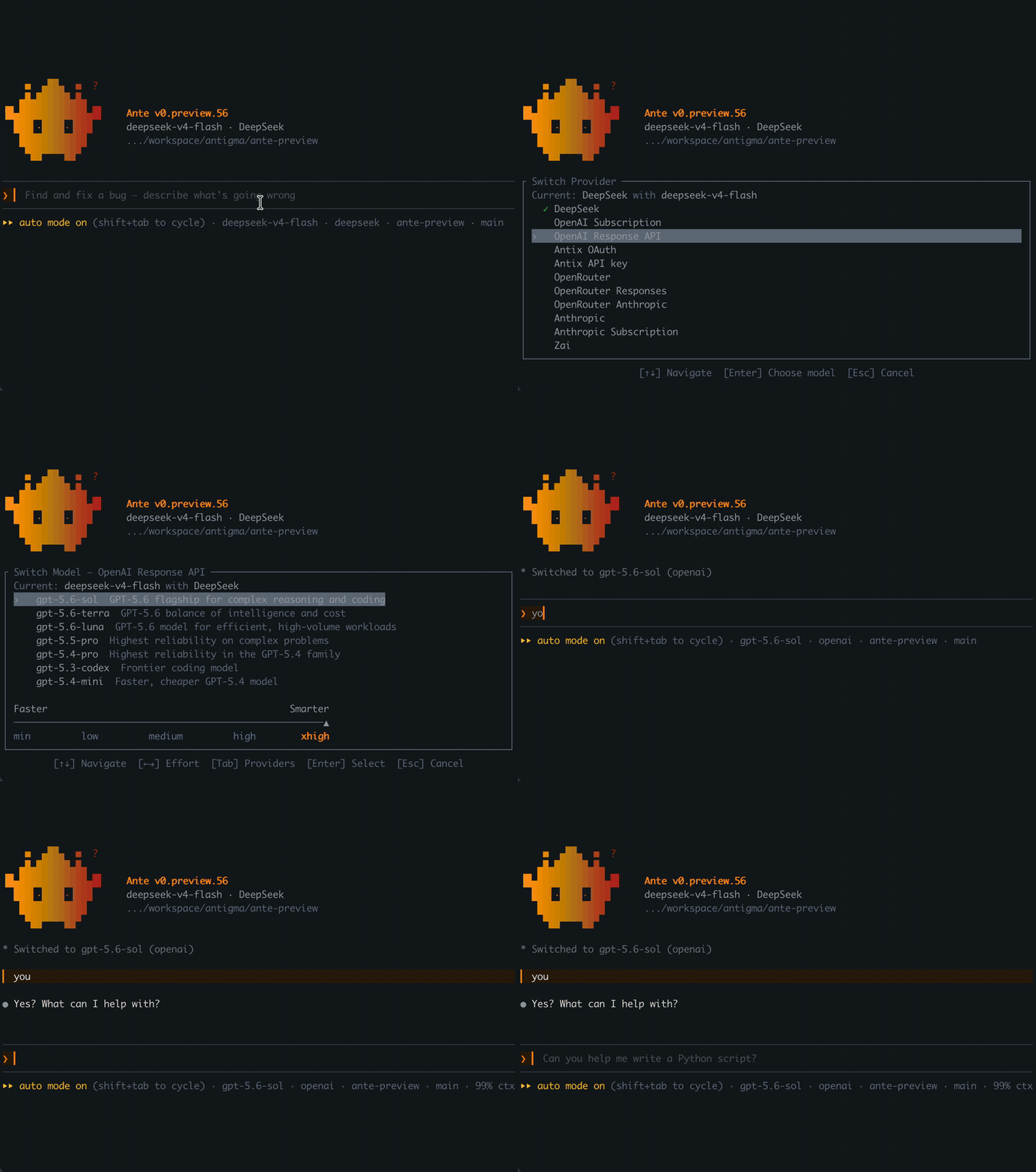
Selecting a model
Type /models in the TUI to open the model selector. It lists the current provider's models (the title shows the scope, e.g. Switch Model — Anthropic). Use the arrow keys to pick a model, adjust the effort slider, and press Enter to confirm.
/models <model_id> skips the dialog and switches straight to that model on the current provider. The id does not have to appear in the picker — anything the provider serves works, so this is how you reach an Open Router model the catalog does not carry. The model starts at its catalog default effort; reopen /models with no argument to move the slider. With no provider selected yet, the id picks the provider the same way --model does on the CLI.
Press Tab to hand off to the provider selector when you want to switch providers instead.
Switching providers
Type /providers to list every provider with its connection state. Press Enter on a connected provider to drill into its model picker — the same model list and effort slider, preselecting the model you last used on that provider. The switch commits only when you confirm with Enter; Esc steps back to the provider list. Enter on an unconnected provider starts its sign-in flow instead (see Providers).
Ante remembers the last model you used on each provider, so hopping between providers puts you back where you left off.
Effort
Effort is Ante's single knob for how hard the model reasons before responding, on a six-level scale:
min · low · medium · high · xhigh · max
min is the lowest effort the model supports — thinking is disabled where the model allows that; models with always-on reasoning clamp to their lowest level. Each provider maps the scale onto its native thinking or reasoning parameter, and providers that expose fewer levels round a requested effort down to the nearest supported one.
In /models, effort is a slider under the model list with one tick per level the selected model actually supports — a model with four native levels shows four ticks, one with all six shows six. Models with no reasoning knob show no slider.
The ladder is built in per provider and model family. For custom providers you can declare it yourself with supported_efforts on the model's catalog entry (see the Catalog Reference) — or run /add-provider, which probes the endpoint and writes the declaration for you.
Anthropic exposes xhigh on Claude Sonnet 5 and Opus 5, Opus 4.7/4.8, and the always-thinking Fable/Mythos 5 family. Opus and Sonnet 4.6 retain their four active adaptive levels (low through high, then max) plus the min off position. Gemini 3.7 and 3.8 expose exactly low, medium, and high — a requested xhigh or max rounds down to high.
Anthropic's API requires temperature: 1 whenever thinking is active. If you've set a different temperature for a Claude model in your catalog or via MODEL_TEMPERATURE, turns with thinking on fail with a message saying so — clear the override to fix it.
Your effort choice is remembered per model in ~/.ante/settings.json, and you can pin it for a run from the CLI:
ante --effort high
You can also set your default model and provider via CLI flags: ante --provider openai --model gpt-5.6-sol, or configure defaults in your preferences.
If you pick a provider without naming a model, Ante starts you on that provider's most capable model and may use a lighter, cheaper one for ambient UI hints such as the spinner's thinking phrase and the next-prompt suggestion — see weight classes. WebFetch itself returns page content to the active session model; it does not invoke a helper model. Vision-capable models are detected automatically, so you can drop images straight into the chat.