Architecture
Overview
Ante follows a clean separation of concerns with a client-daemon architecture. The UI and core logic are decoupled through message passing, making it possible to swap frontends (TUI, headless) without changing the underlying engine.
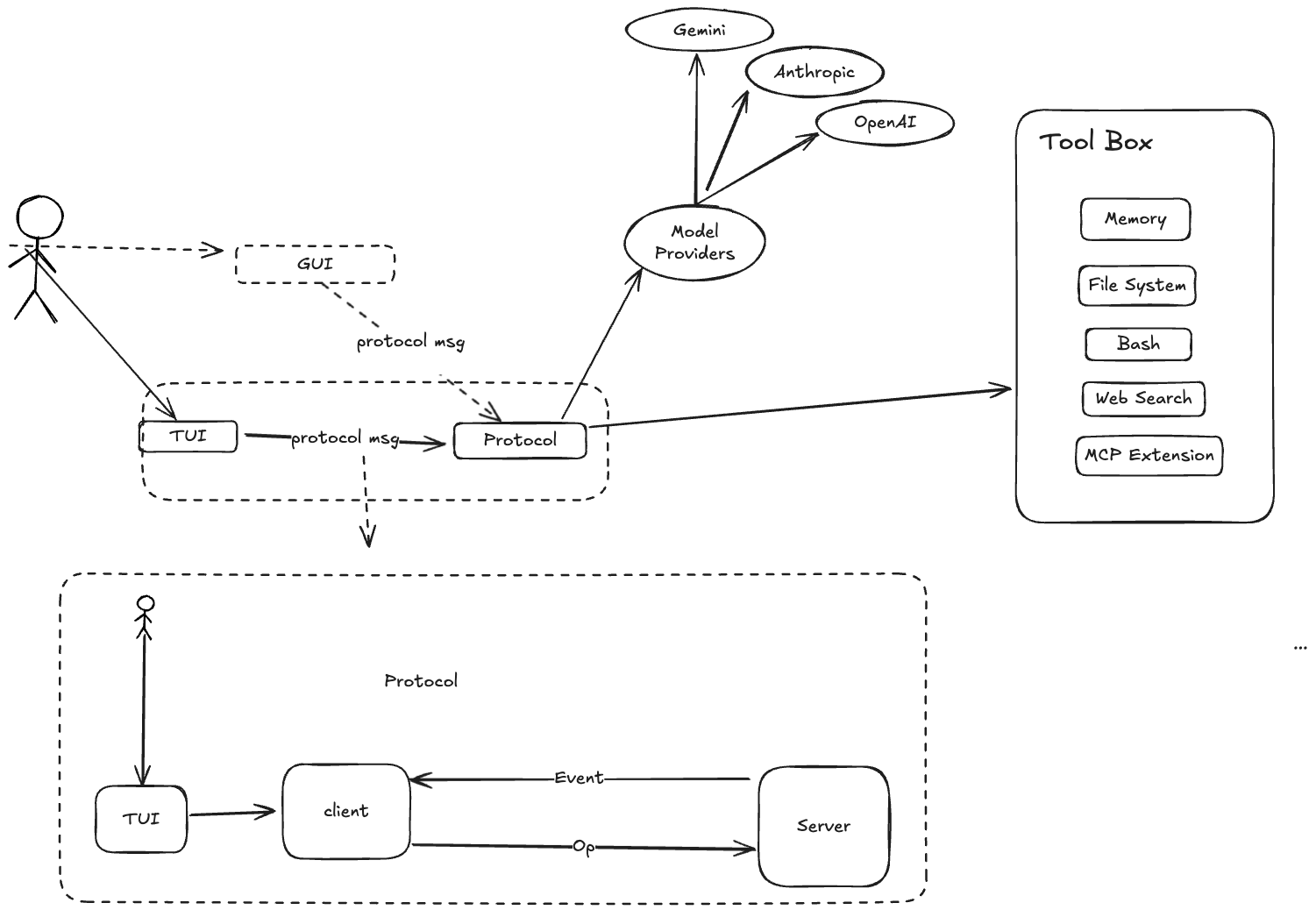
Client-Daemon split
┌────────────────┐          ┌─────────────────────────────┐
│     Client      │    Op    │          Daemon              │
│                 │ ───────▶ │                              │
│  TUI / Headless │          │  Session ─▶ Turn ─▶ Step    │
│  or Serve       │ ◀─────── │                              │
│                 │    Evt   │  Tools    Providers   Store  │
└────────────────┘          └─────────────────────────────┘
- Client — The user-facing layer. The ratatui-based TUI, headless CLI runner, or an external process connected via
ante serve. SendsOpoperations and rendersEvtevents. - Daemon — The core engine. Receives operations, manages sessions, dispatches to LLM providers, schedules tool execution, and emits events.
- Transport — Bounded async channels (Tokio) for in-process clients (TUI, headless), JSONL over stdin/stdout for external clients (
ante serve --stdio), or WebSocket for networked clients (ante serve --ws). Message IDs enable tracing across the boundary.
Architecture direction: Session-centric to Agent-centric
Ante started with a session-centric runtime where Session is the primary execution owner. We are moving toward an agent-centric runtime, where long-lived Agent instances own execution and communicate through messages.
This is similar to an actor-based model:
- Agent as actor — Each agent has isolated state, a mailbox, and a single logical execution loop.
- Message-driven coordination — Agents coordinate via typed messages/events instead of shared mutable state.
- Hierarchical supervision — Parent agents can spawn child agents (sub-agents), monitor outcomes, and decide retry/escalation policy.
Why this shift:
- Better isolation between concurrent tasks and sub-agents
- Clear ownership of memory, permissions, and tool budgets per agent
- More predictable scaling as workflows become multi-agent
In this direction, Session remains important, but as a container for user interaction history, persistence, and protocol-level coordination rather than the only unit of execution.
LLM providers
Ante is provider-agnostic. Each provider implements a common interface for sending prompts and receiving streaming responses.
| Provider | Wire Format | Models |
|---|---|---|
| Anthropic | Messages API | Claude family (haiku-4-5, sonnet-4-5, sonnet-4-6, opus-4-6) |
| Anthropic Subscription | Messages API | Claude family (OAuth) |
| OpenAI | Responses API | GPT-5 family |
| OpenAI Compatible | Chat Completions | Custom models |
| OpenAI Subscription | Responses API | GPT-5 family (OAuth via Codex) |
| Gemini | Gemini API | Gemini 3.1 family |
| Vertex AI Gemini | Gemini API | Gemini 3.1 family |
| Grok (xAI) | Responses API | Grok 4 |
| Zai | OpenAI-compatible | GLM-5.1 |
| Open Router | OpenAI-compatible | Multiple providers |
| DeepSeek | OpenAI-compatible | DeepSeek V4 family |
| Ali Coding Plan | Messages API | Qwen, Kimi, GLM, MiniMax via DashScope |
| Antix | Anthropic Messages | Claude, GPT, Gemini, Qwen via Antigma |
| Local | OpenAI-compatible | GGUF models via llama.cpp |
Providers are resolved from a catalog at session init time. The user can override via CLI flags (--provider, --model) or persistent settings.
Authentication
- API keys — Set via environment variables (
ANTHROPIC_API_KEY,OPENAI_API_KEY,GEMINI_API_KEY,XAI_API_KEY,OPENROUTER_API_KEY,OPENAI_COMPATIBLE_API_KEY,Z_AI_API_KEY,DEEPSEEK_API_KEY,ALI_CODING_PLAN_API_KEY,VERTEX_GEMINI_API_KEY,ANTIX_API_KEY) - OAuth — Interactive OAuth flow supported for Anthropic, OpenAI, and Antix, handled through the TUI
Tool system
Tools are the agent's hands. Each tool implements the Tool trait:
#[async_trait]
pub trait Tool: Send + Sync {
    fn metadata(&self) -> &ToolMetadata;
    async fn call(&self, input: ToolCallInput) -> Result<ToolCallOutput>;
}
Built-in tools
| Tool | Category | Approval | Description |
|---|---|---|---|
Read | File I/O | No | Read text, image, or PDF file contents |
Write | File I/O | Yes | Create or overwrite files |
Edit | File I/O | Yes | Exact string replacement in files |
Glob | File I/O | No | Find files by pattern |
Grep | File I/O | No | Search file contents with regex |
Bash | Shell | Yes | Execute shell commands; supports run_in_background for long-running processes |
PTY | Shell | No | Drive a persistent tmux session for interactive programs (opt-in) |
Agent | Builtin | No | Spawn sub-agent for complex tasks |
TodoWrite | Builtin | No | Manage task lists |
WebFetch | Builtin | Yes | Fetch and process web content |
WebSearch | Builtin | Yes | Search the web (opt-in) |
ImageRead | Builtin | No | Read and analyze images (opt-in) |
Browser | Web | Yes | Drive Chromium via CDP (requires browser cargo feature) |
Tool filtering
Tools can be filtered at session level:
- Allowed list (
--allowed-tools) — Only these tools are available - Disallowed list (
--disallowed-tools) — These tools are removed - Supports ToolMatcher syntax:
Bash(ls -la),Agent(explore) - Names are matched case-insensitively
Session lifecycle
- Client sends
Op::StartSessionwith model, provider, and policy - Daemon resolves the provider, authenticates, discovers skills and sub-agents
- Daemon creates a
Sessionand emitsEvt::SessionStart - User sends
Op::UserInputto start a task - Session spawns a
Turnwhich communicates with the LLM - Turn executes tools, requests approvals, and eventually completes
- When the context budget nears the limit, auto-compaction summarizes the history
Storage
Ante stores configuration and state across several locations:
| Location | Purpose |
|---|---|
~/.ante/settings.json | User preferences (model, provider, theme) |
~/.ante/catalog.json | Custom provider/model catalog |
~/.ante/skills/ | User-level skills |
~/.ante/agents/ | User-level sub-agents |
~/.ante/sessions/<session-id>/ | Persisted sessions (for /resume and --resume) |
~/.ante/projects/<project-id>/memory/ | Per-project auto-memory |
~/.ante/cache/<project-id>/ | Per-project temporary files |
.ante/ | Project-local configuration (skills, sub-agents) |
The ANTE_HOME environment variable can override the home config directory.